Interact with Midjourney using Discord API • Part I

Introduction
This practical guide shows you how to create basic automation using Midjourney /imagine command as an example.
For this exercise, you’ll need a Discord account with an active Midjourney subscription, $10 Basic Plan will do just fine.
Follow these simple steps to obtain:
Discord server id number, referenced in this article as {{server_id}}
Discord channel id number, referenced in this article as {{channel_id}}
Discord token, referenced in this article as {{discord_token}}
We will be using listed below Discord API public endpoints below
Application Commands to get Midjourney imagine command details and post the imagine interaction to the desired Discord channel
Get Channel Messages to retrieve the imagine interaction(s) results (messages) from the Discord channel
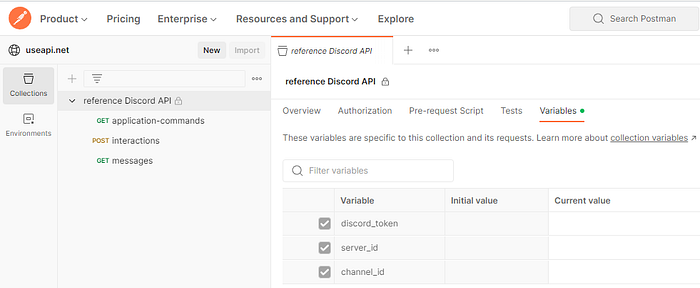
Please feel free to use the public Postman collection referencing Discord API mentioned in this article. Make sure to place your values into collection variables and save them before executing GET and POST collection calls:
Discord API authorization
All Discord API calls mentioned here require HTTP Authorization header with {{discord_token}}, for example:
Authorization: {{discord_token}}
Retrieve imagine Discord interaction details
Execute application-commands GET request https://discord.com/api/v10/channels/{{channel_id}}/application-commands/search?type=1&include_applications=true&query=imagine
Response body:
{
    "applications": [
        {
            "id": "936929561302675456",
            "name": "Midjourney Bot",
            "icon": "f6ce562a6b4979c4b1cbc5b436d3be76",
            "description": "Generate an image based on a text prompt in under 60 seconds using the </imagine:938956540159881230> command!\n\nhttps://docs.midjourney.com/docs/terms-of-service",
            "summary": "",
            "type": null,
            "bot": {
                "id": "936929561302675456",
                "username": "Midjourney Bot",
                "global_name": null,
                "avatar": "f6ce562a6b4979c4b1cbc5b436d3be76",
                "discriminator": "9282",
                "public_flags": 589824,
                "bot": true,
                "avatar_decoration_data": null
            }
        }
    ],
    "application_commands": [
        {
            "id": "938956540159881230",
            "application_id": "936929561302675456",
            "version": "1118961510123847772",
            "default_member_permissions": null,
            "type": 1,
            "nsfw": false,
            "name": "imagine",
            "description": "Create images with Midjourney",
            "dm_permission": true,
            "contexts": [
                0,
                1,
                2
            ],
            "integration_types": [
                0
            ],
            "options": [
                {
                    "type": 3,
                    "name": "prompt",
                    "description": "The prompt to imagine",
                    "required": true
                }
            ]
        }
    ],
    "cursor": {
        "previous": "WzExNTE1NDQ4NzM4MjA4OTMzMDYsIDAsIDkzODk1NjU0MDE1OTg4MTIzMF0=",
        "next": null,
        "repaired": false
    }
}
We will need application_commands[0] object which has imagine command details, let’s extract it for future references:
        {
            "id": "938956540159881230",
            "application_id": "936929561302675456",
            "version": "1118961510123847772",
            "default_member_permissions": null,
            "type": 1,
            "nsfw": false,
            "name": "imagine",
            "description": "Create images with Midjourney",
            "dm_permission": true,
            "contexts": [
                0,
                1,
                2
            ],
            "integration_types": [
                0
            ],
            "options": [
                {
                    "type": 3,
                    "name": "prompt",
                    "description": "The prompt to imagine",
                    "required": true
                }
            ]
        }
Compose and execute imagine interaction to the desired Discord channel
Execute interactions POST request https://discord.com/api/v10/interactions
Request payload:
{
    "type": 2,
    "application_id": "936929561302675456",
    "guild_id": "{{server_id}}",
    "channel_id": "{{channel_id}}",
    "session_id": "{{$randomInt}}",
    "data": {
        "version": "1118961510123847772",
        "id": "938956540159881230",
        "name": "imagine",
        "type": 1,
        "options": [
            {
                "type": 3,
                "name": "prompt",
                "value": "YOUR MIDJOURNEY PROMPT GOES HERE"
            }
        ],
        "application_command": {
            "id": "938956540159881230",
            "application_id": "936929561302675456",
            "version": "1118961510123847772",
            "default_member_permissions": null,
            "type": 1,
            "nsfw": false,
            "name": "imagine",
            "description": "Create images with Midjourney",
            "dm_permission": true,
            "contexts": [
                0,
                1,
                2
            ],
            "integration_types": [
                0
            ],
            "options": [
                {
                    "type": 3,
                    "name": "prompt",
                    "description": "The prompt to imagine",
                    "required": true
                }
            ]
        },
        "attachments": []
    }
}
Fields
application_idandapplication_commandshould be set to values extracted in the step above.Place your Midjourney prompt into
data.options[0].valuefield.{{session_id}}can be just any random integer number, if you using the linked above Postman collection this value will be autogenerated by Postman.
HTTP Response Status should be 204 No Content, any other response status indicates a problem with your payload.
Finally, retrieve imagine command results
Execute messages GET request
https://discord.com/api/v10/channels/{{channel_id}}/messages
Response body (redacted for brevity):
[
    {
        "id": "<Discord message id>",
        "type": 0,
        "content": "**YOUR MIDJOURNEY PROMPT GOES HERE --s 750 --v 5.2** - <@.Discord user id> (fast)",
        "channel_id": "<Discord channel id>",
        "attachments": [
          {
              "url": "<generated image url>",
              "proxy_url": "<generated proxy image url>",
              "width": 2048,
              "height": 2048,
              "content_type": "<generated image type>",
              "id": "<Discord image id>",
              "filename": "<generated image name>",
              "size": 7204115
          }
        ],
        "components": [
            {
                "type": 1,
                "components": [
                    {
                        "type": 2,
                        "custom_id": "MJ::JOB::upsample::1::45e9bf62-5f3d-4bd6-a567-958af28f15d3",
                        "style": 2,
                        "label": "U1"
                    },
                    {
                        "type": 2,
                        "custom_id": "MJ::JOB::upsample::2::45e9bf62-5f3d-4bd6-a567-958af28f15d3",
                        "style": 2,
                        "label": "U2"
                    },
                    {
                        "type": 2,
                        "custom_id": "MJ::JOB::upsample::3::45e9bf62-5f3d-4bd6-a567-958af28f15d3",
                        "style": 2,
                        "label": "U3"
                    },
                    {
                        "type": 2,
                        "custom_id": "MJ::JOB::upsample::4::45e9bf62-5f3d-4bd6-a567-958af28f15d3",
                        "style": 2,
                        "label": "U4"
                    },
                    {
                        "type": 2,
                        "custom_id": "MJ::JOB::reroll::0::45e9bf62-5f3d-4bd6-a567-958af28f15d3::SOLO",
                        "style": 2,
                        "emoji": {
                            "name": "🔄"
                        }
                    }
                ]
            },
            {
                "type": 1,
                "components": [
                    {
                        "type": 2,
                        "custom_id": "MJ::JOB::variation::1::45e9bf62-5f3d-4bd6-a567-958af28f15d3",
                        "style": 2,
                        "label": "V1"
                    },
                    {
                        "type": 2,
                        "custom_id": "MJ::JOB::variation::2::45e9bf62-5f3d-4bd6-a567-958af28f15d3",
                        "style": 2,
                        "label": "V2"
                    },
                    {
                        "type": 2,
                        "custom_id": "MJ::JOB::variation::3::45e9bf62-5f3d-4bd6-a567-958af28f15d3",
                        "style": 2,
                        "label": "V3"
                    },
                    {
                        "type": 2,
                        "custom_id": "MJ::JOB::variation::4::45e9bf62-5f3d-4bd6-a567-958af28f15d3",
                        "style": 2,
                        "label": "V4"
                    }
                ]
            }
        ],
    },
]
The Discord endpoint for messages returns the top 50 messages from {{channel_id}}, with the most recent returned first. Depending on Midjourney settings and server load, it can take anywhere from approximately 20 seconds (fast mode) to 10 minutes (relax mode) to generate an image.
You can execute the above call in the loop with 10…20 secs delay between calls until components array is not empty. Then extract the generated image from attachments[0].url field.
In our next article, we will cover ways to detect Midjourney prompt moderation, the execution of Midjourney upscale or create variations and enhance or modify button commands.
Subscribe to stay informed.
Please visit https://useapi.net to learn more about Midjourney API

